NetApp SANtricity Management Software
NetApp E-Series hybrid and EF-Series all-flash systems run on the SANtricity software platform.
SANtricity OS and management software give storage administrators the ability to achieve maximum performance and utilization of their flash arrays, perform online configuration and management tasks, and manage at scale.
Businesses rely on core applications to deliver consistent performance and continuous availability. Storage systems must be able to be quickly deployed, easily managed, and work flawlessly with your application software. Because operations depend on these applications, 99.999% availability or higher is mandatory. To meet these requirements, you require proven enterprise-grade storage and software.
For application environments, including high-performance computing, video surveillance, backup and recovery, and big data analytics, NetApp E-Series storage arrays with SANtricity management software offer industry-leading performance, reliability, and ease of use.
SANtricity Operating System
NetApp SANtricity operating system (OS) accelerates performance for high-IOPS and low-latency applications as well as high-bandwidth and high-throughput applications—all from the same enterprise-grade storage building block. SANtricity OS is the most deployed SAN storage OS and has an installed base of a million operating systems. SANtricity OS provides:
• Reliability and high availability
• Online administration
• Advanced data protection
SANtricity OS and E-Series hardware exceed 99.999% availability to deliver optimal data access, integrity, and protection. Its automated I/O path failover, RAID and DDP protection, proactive monitoring, and online maintenance capabilities mean that data will always be available.
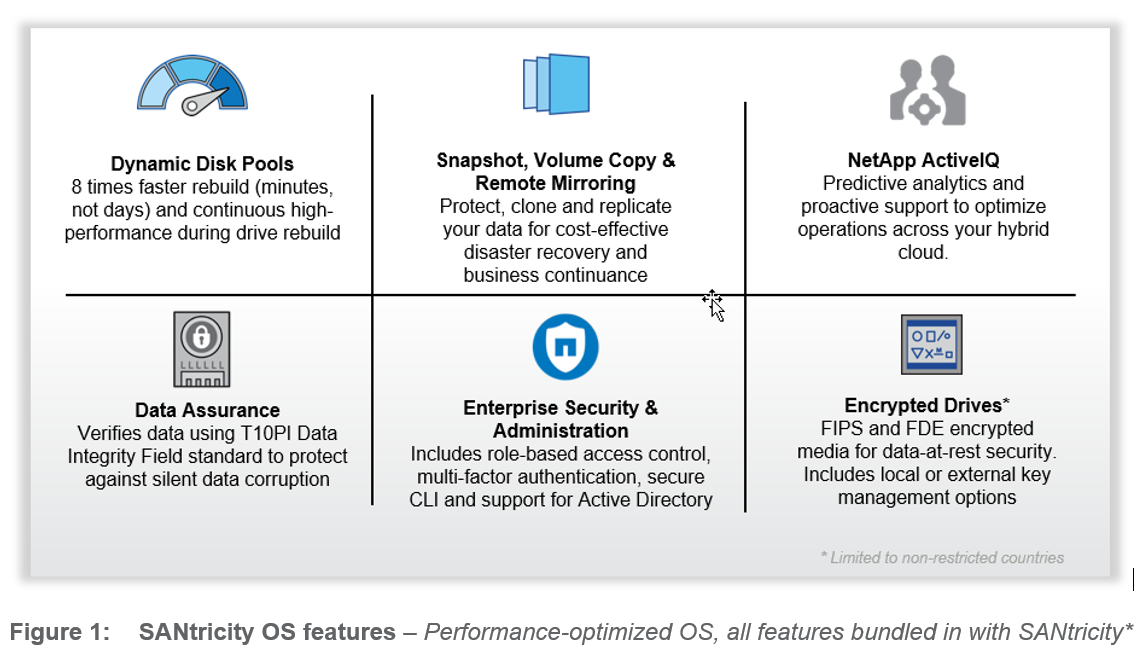
SANtricity DDP (Dynamic Disk Pools) technology gives storage administrators the ability to simplify RAID management, improve data protection, and maintain predictable performance under all conditions. DDP technology evenly distributes data, protection information, and spare capacity across a pool of drives, simplifying setup and maximizing use. This minimizes the performance impact of a drive failure and can return the system to optimal condition up to 8 times faster than traditional RAID. With shorter rebuild times and exclusive technology to prioritize reconstruction, DDP significantly reduces exposure to multiple failures, offering a level of data protection that cannot be achieved with traditional RAID.
Data assurance verifies data integrity from the controller to the drive. By conforming to the T10 PI standard, E-Series provides this additional data confidence. DDP technology significantly lowers data exposure during drive failure by reconstructing data much faster, while at the same time protecting performance.
“The NetApp EF-Series is so fast that we no longer have I/O problems. Now we need faster CPUs in our servers!"
— Ray DeJean Client Connectivity Leader, Southeastern Louisiana University
Online Administration
All management tasks can be performed while the storage remains online with complete read and write data access. Storage administrators can use SANtricity management software to make configuration changes, perform maintenance, or expand storage capacity without disrupting I/O to attached hosts due to the following capabilities:
-
Nondisruptive controller firmware and drive firmware upgrades: No downtime.
-
NetApp DDP technology: Simplifies traditional storage management with no idle spares to manage or reconfigure when drives are added or when they fail. This capability enables automatic configuration, expansion, and scaling of storage.
-
Capacity expansion and reduction of DDP pools: Gives administrators the ability to add or remove as many as 60 drives at a time for a pool. The pool dynamically rebalances to adjust for these drive count changes, with no requirement for parity recalculation.
-
Physical and logical expansion: Gives administrators the ability to add new drive modules and create new pools, volume groups, and volumes, without disrupting access to existing data.
-
Dynamic volume expansion (DVE): Gives administrators the ability to expand the capacity of an existing volume by using the free capacity on an existing volume group or DDP. DVE redistributes or rebalances for maximum performance and utilization.
-
RAID-level migration: Changes the RAID level of a volume group on existing drives without relocating data. The migration operation supports RAID levels 0, 1, 5, 6, and 10. Additionally, dynamic segment size migration can be supported on RAID volumes.
-
Capacity expansion for volume groups: Allows the addition of up to two drives at a time to an existing volume group. This capability introduces free capacity for volume creation or expansion and improves performance of the volumes that reside on that volume group.
Advanced Data Protection
The SANtricity OS exceeds basic high-availability features to offer optimal data access, integrity, and protection. Its automated I/O path failover and extensive online configuration, reconfiguration, and maintenance capabilities enable data to be always available. Your data is fully protected with SANtricity OS extensive technologies, including:
-
Remote mirroring (available on EF570, E5700, EF280, E2800)
-
Snapshot capabilities.
-
Drive encryption.
Remote Mirroring
On the systems where it is supported, remote mirroring protects information by continuously replicating or mirroring local volumes to volumes on a remote storage system. A variety of replication options are available to optimize data protection and business application recovery for each set of volumes that make up a mirror pair. The remote mirroring functionality includes the capability to suspend and resume with delta resynchronization, to mirror groups for consistency, and to create volume snapshot copies of the remote data while the mirror remains active. With cross-mirroring, two separate systems can function as remote disaster recovery sites. Asynchronous mirroring is supported with FC or IP based connections. Synchronous mirroring is supported on FC only.
SANtricity Snapshot
NetApp SANtricity Snapshot™ copies create point-in-time images, or logical copies, of a storage volume and enable secondary servers to access a suspended version of the data for a variety of applications, including backup, file restoration, application testing or development, information analysis, and data mining.
Drive Encryption and Key Management
SANtricity drive encryption services offer comprehensive security for data at rest on the drive without affecting storage system performance or ease of use. Drive-based AES-256 encryption provides data security in cases such as drive theft, routine defective drive servicing, or repurposing of drives. You can choose to manage drive authentication keys natively for a simple lowest-cost solution or use a KMIP-compliant external key manager for centralized administration.
SANtricity Management Software: Building Blocks for a Fast, Simple, Reliable Storage Infrastructure
SANtricity management software provides the building blocks that enable manageability advantages through configuration flexibility, custom performance tuning, scalable management, and complete control over data placement. SANtricity management software provides interfaces to manage in the way best for your environment and unlock the power of SANtricity OS:
• SANtricity System Manager GUI.
• SANtricity Web Services RESTful API
• SANtricity Command Line Interface
• SANtricity Unified Manager
• SANtricity Cloud Connector
• SANtricity Storage Manager (for environments with a mix of legacy and current arrays)
SANtricity System Manager
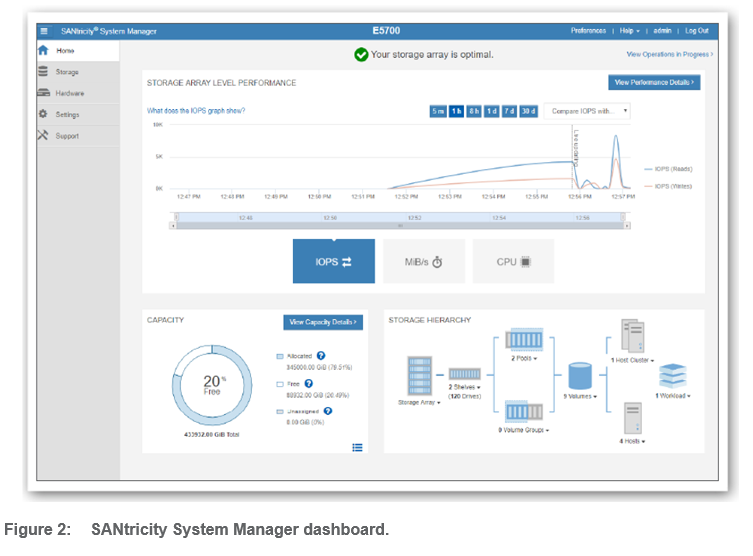
SANtricity System Manager is an embedded web-based management GUI that is included in all SANtricity OS versions running on current E-Series arrays. SANtricity System Manager gives you the flexibility to log in to an individual E2800, EF280, E5700, EF570, or EF600 system from various web browsers and manage your storage through an easy-to-use, on-box web interface. Intuitive workflow wizards and context-sensitive online help streamline configuration tasks.
With the SANtricity OS and System Manager, you can create up to 512 heterogeneous hosts or clusters of hosts from a single E-Series storage system, each with different characteristics, to address the storage needs of the server.
DDP and RAID volume groups can coexist in the storage system allowing a variety of workloads with different capacity, performance, and data protection demands to share a single E-Series storage system.
Performance Monitoring
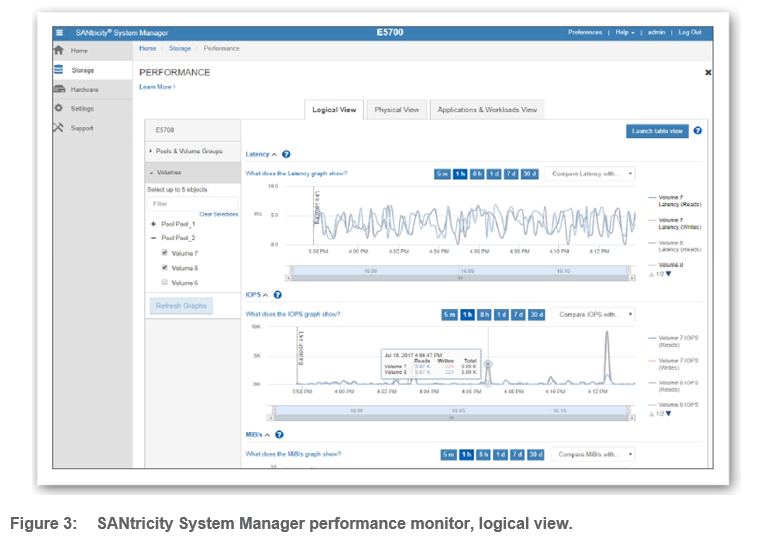
SANtricity System Manager’s performance monitor lets you view information from the system level down to individual drives, retaining 30 days’ worth of data on the system. System Manager’s volume tagging capability allows filtering of performance information by workload. The performance data can also be exported for further analysis.
“NetApp has allowed us to reach a capacity of more than 1,200 concurrent users while providing exceptional system performance. That’s five times our previous maximum.”
— Bill Kernan, CIO, Western Oregon University
AutoSupport and Proactive Event Monitoring
Quickly identifying and resolving issues is critical for enterprise storage. SANtricity System Manager provides alerts through NetApp Active IQ, email, and SNMP. Benefits include:
• Extensive capturing of diagnostic data provides comprehensive fault isolation and simplifies analysis of unanticipated events.
• Intelligent management of SSDs offers wear-life reporting and proactive warnings.
• System Manager’s integrated Recovery Guru diagnoses problems and provides the step by step recovery.
• NetApp Active IQ provides proactive dispatch and maintenance.
SANtricity System Manager Security Features
System Manager security features include:
• Administer access with role-based access control and audit log
• Manage digital certificates (import, export, CSR)
• Set up LDAP/LDAPS server for user authentication
• Manage data-at-rest encryption with FDE or FIPS drives, including Secure Erase
• Configure external key management server (KMIP compliant)
• Support multifactor authentication via SAML 2.0
• Common Criteria certified
SANtricity Web Services REST API
SANtricity Web Services is a fully featured REST (representational state transfer) API embedded on E2800, EF280, E5700, EF570, and EF600 systems. This is the interface used by SANtricity System Manager, and in proxy form by SANtricity Unified Manager.
SANtricity Web Services gives you the ability to create your own DevOps solutions, and also makes possible these solutions:
• NetApp E-Series Performance Analyzer (for Grafana).
• Ansible role and module-based automation.
• NetApp SANtricity Performance App for Splunk Enterprise.
SANtricity Command Line Interface
SANtricity CLI is a long-standing tool for simple scripting. The syntax has been preserved. In current products and it is now a secure interface. Starting with SANtricity OS 11.60, the CLI is downloadable through SANtricity System Manager.
SANtricity Unified Manager
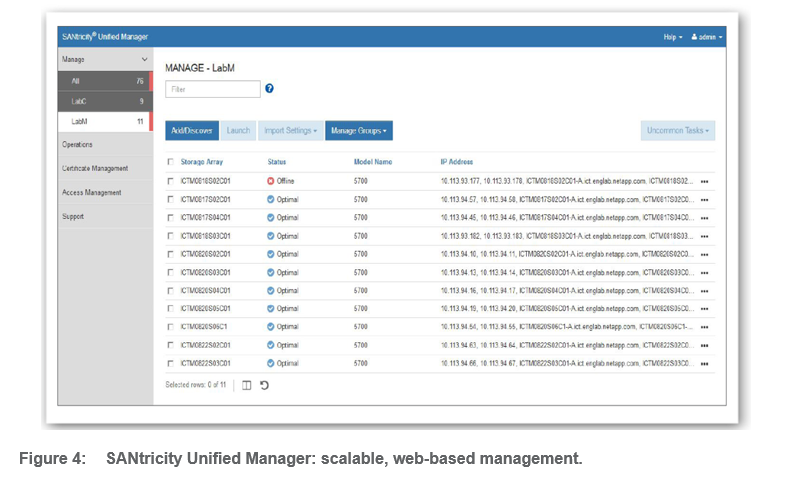
SANtricity Unified Manager provides a browser-based interface for scalable management of up to 500 E2800, EF280, E5700, EF570, and EF600 systems. From a single window, you can view status, organize arrays into groups, set up remote mirroring, and launch the on-box SANtricity System Manager for each array. You can update SANtricity OS for multiple arrays and quickly set up alerts and settings for multiple arrays. Like SANtricity System Manager, LDAP/RBAC and certificate management are supported. Installation can be on Linux or Windows.
SANtricity Cloud Connector
SANtricity Cloud Connector provides cost-effective cloud backup and restore for volumes on E5700, EF570, E2800, and EF280 via FC and iSCSI. Cloud Connector is a host-based, separately installed Linux application that gives you the ability to perform full block-based and file-based backup and recovery of E-Series volumes to S3-compliant accounts.
SANtricity Storage Manager
SANtricity Storage Manager delivers basic enterprise management capabilities for legacy and newer E-Series storage. If you have a mix of E-Series systems, SANtricity Storage Manager provides an enterprise view, discovering legacy E-Series storage systems as well as the E2800, EF280, E5700, EF570, and EF600. From a single console, you can view status and launch the appropriate management application per storage system. SANtricity Storage Manager is installed on a Linux or Windows management server. If you do not have legacy systems older than EF600, E5700, EF570, E2800, or EF280, Storage Manager is not required.